
Content Information
On this page...
Design Process Flow Chart For Bridge Replacement Projects
This chapter contains flowcharts for common types of projects completed by the Office of Design. The information in each flowchart provides a general workflow to successfully complete each project. The flowcharts contain a variety of tasks that may be ongoing throughout the project, or concurrent with other steps in the project development process. Special situations need to be addressed on a project by project basis. It is recommended that individuals make a customized checklist for each ongoing project to better assist managers and project teams.
Back to topFlow Charts
Design Process Flow Chart For Bridge Replacement Projects
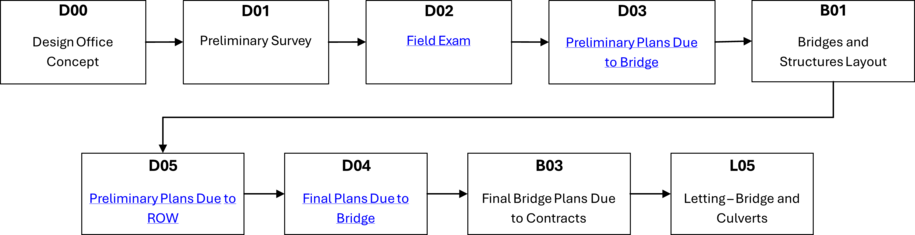
Use the links in the event boxes to display task lists for that event. A task list will show the major design activities, steps to complete each activity, along with relative Design Manual sections and Project Automation references.
D2 Event Task List Bridge Replacement | ||||
|---|---|---|---|---|
| Major Design Tasks Completed | Resources | |||
| Design Manual References | Automation References | |||
| Review available materials | ||||
| − Concept from Preliminary Design | ||||
| − Survey and Photo information | 1D-3 | Preliminary Survey Procedure | 20B-51 | Folder and Files, Photo and Survey |
| 20A-2 | Survey Request | |||
| − As-built plans | ||||
| − Project schedule | ||||
| Determine design criteria | ||||
| − Select and document design criteria | 1C-1 | Selecting Design Criteria | ||
| 1C-8 | Documenting Design Decisions | |||
| − Establish roadway typicals | 21B-155 | Typical Component Tool | ||
| − Review design traffic from Pavement Design | ||||
| − Review preliminary pavement design from Pavement Design | ||||
| Prepare project directory | ||||
| − Create folders and sub-folders | 20B-41 | Project Directory Folder Structure | ||
| 20B-44 | Project Directory Design Folder Structure | |||
| 20B-81 | Project Directory Letting Folder Structure | |||
| − Create CAD files | 20A-1 | Start New MicroStation Project | ||
| 20A-3 | Plan Development CADD Standards | |||
| 20B-1 | Design Seed File Listing | |||
| 21C-54 | CopySeed Program | |||
| 21A-40 | Create New Models | |||
| 21A-50 | Reference Attach | |||
| 21A-51 | Reference Detach | |||
| 21A-46 | Ref File Level Lock | |||
| − Configure Geopak | 21B-65 | Geopak Project Manager | ||
| Establish horizontal and vertical alignments | ||||
| − Decide on either a survey alignment or an office relocation alignment | ||||
| − Create horizontal alignment | 2A-1 | Horizontal Curve Design | ||
| 2A-3 | Superelevation Tables | |||
| 2C-1 | Spiral Curve Design | |||
| 2D-1 | Reverse Curve Design | |||
| − Draw horizontal alignment to CAD file | 21A-201 | COGO Alignments, Plan View | ||
| − Create vertical alignment | 2B-1 | Vertical Curve Design | ||
| − Draw vertical alignment to CAD file | 21A-202 | COGO Profiles, Alignments | ||
| − Design superelevation | 2A-2 | Superelevation | 21B-68 | Superelevation – Automated |
| 2A-3 | Superelevation Tables | |||
| − Review project for pedestrian and bicyclist needs and adjust design to be ADA compliant | 12C-1 | Check for ADA Compliance | ||
| − Initiate TS&L development with Preliminary Bridge | ||||
| Develop 3D roadway model | 21B-200 | Corridor Modeler | ||
| − Copy seed Template Library to project directory | ||||
| − Initiate Geopak Corridor Modeler tool | ||||
| − Select COGO database (gpk file) | ||||
| − Set Preferences | ||||
| − Confirm chord settings | ||||
| − Set Template Library path to project directory | ||||
| − Import DTM | ||||
| − Import Geometry | ||||
| − Import Plan Graphics (if initially known) | ||||
| − Initiate Template Library tool | 21B-224 | Corridor Modeler Templates and Components | ||
| − Create project template folder | ||||
| − Select ready to use templates or assemble custom templates | ||||
| − Initiate Roadway Designer tool | ||||
| − Open Corridor Management dialog and create corridors | ||||
| − Open Template Drop dialog and add templates to a corridor | ||||
| − Process initial template drop and review model | ||||
| − Customize model with additional Template Drops, Point Controls, Secondary Alignments, Parametric Constraints, etc. | ||||
| − Build surfaces from Create Surfaces dialog | ||||
| Develop cross sections | ||||
| − Initiate Geopak Corridor Modeler tool | ||||
| − Initiate Draw Cross Sections tool | 21B-250 | Draw Cross Sections from Surfaces | ||
| − Annotate preliminary cross sections | 21B-280 | Corridor Modeler Labeler | ||
| Develop staging details | ||||
| − Request a copy of the transportation management plan (if available) | 9A-5 | Traffic Control Plans | ||
| − For on-site detour develop: | 9C-6 | On-Site Detours and Temporary Connections | ||
| − Repeat steps followed for mainline design | ||||
| − Plan temporary waterway crossing structure | ||||
| − For off-site detour develop: | ||||
| − Map of possible detour routes | 21A-39 | Ref-Map | ||
| − For stage construction develop: | ||||
| − Possible staging typicals | ||||
| − Preliminary staging plan | ||||
| − Identify any access/entrance issues | ||||
| − Prepare staging and traffic control tabulations | 9A-5 | Traffic Control Plans | ||
| Build field exam plan set | 1F-1 | Plan Sheets – General Information | ||
| − Title Sheet - [A.1] | 1F-2a | Title Sheet | 21A-39 | Ref-Map |
| − Legend Sheet - [A.2] | 1F-2b | Location Map Sheets | ||
| − Typical Detail Sheets - [B] | 1F-3a | Typical Cross Sections | ||
| − Quantity Sheets (if necessary) - [C] | 1F-4 | C Sheets | ||
| − Plan & Profiles Sheets - [D,E,F] | 1F-5b | Plan and Profile Sheets | 21B-4 | P & P Geopak Sheeting Instruction |
| − Survey Info - [G] | 1F-8 | G Sheets | ||
| − Staging & Traffic Control Sheets - [J] | 1F-10 | J Sheets | ||
| − Situation Plan Sheets - [V] | 1F-22 | V Sheets | ||
| − Cross Section Sheets - [W,X,Y,Z] | 1F-23 | W, X, and Y Sheets | ||
| 1F-24 | Z Sheets | |||
| Field exam | ||||
| 1D-9 | Field Examination Checklist (New and Reconstructed Highways) | |||
| 1D-10 | Field Examination Checklist (3R and 4R Projects) | |||
| Deliverables | ||||
| − Pre Field Exam Plans | ||||
| − Field Exam Letter | ||||
| − Post Field Exam Plans/Review | ||||
| − Updated cost estimate | 1B-6 | Project Cost Estimates | ||
| − Completed event in PSS | ||||
D3 Event Task List Bridge Replacement | ||||
|---|---|---|---|---|
| Major Design Tasks Completed | Resources | |||
| Design Manual Sections | Automation Tools | |||
| Update typicals | ||||
| Update horizontal and vertical alignments | ||||
| - Complete ADA design | 12A-2 | Accessible Sidewalk Requirements | ||
| - Complete geometric design | ||||
| Detail entrance and access locations | ||||
| Update roadway models and cross sections | ||||
| Update traffic control and staging details | ||||
| Preliminary plan set (updated Field Exam Plans) | 1F-1 | Plan Sheets – General Information | ||
| − Title Sheet - [A.1] | 1F-2a | Title Sheet | 21A-39 | Ref-Map |
| − Legend Sheet - [A.2] | 1F-2b | Location Map Sheets | ||
| − Typical Detail Sheets - [B] | 1F-3a | Typical Cross Sections | ||
| − Quantity Sheets (if necessary) - [C] | 1F-4 | C Sheets | ||
| − Plan & Profiles Sheets - [D,E,F] | 1F-5b | Plan and Profile Sheets | 21B-4 | P & P Geopak Sheeting Instruction |
| − Survey Info - [G] | 1F-8 | G Sheets | ||
| − Staging & Traffic Control Sheets - [J] | 1F-10 | J Sheets | ||
| − Situation Plan Sheets - [V] | 1F-22 | V Sheets | ||
| − Cross Section Sheets - [W,X,Y,Z] | 1F-23 | W, X, and Y Sheets | ||
| 1F-24 | Z Sheets | |||
| Deliverables | ||||
| − Submittal Letter | ||||
| − Preliminary Plans | ||||
| − Updated cost estimate | 1B-6 | Project Cost Estimates | ||
| − Completed event in PSS | ||||
D4 Event Task List Bridge Replacement | ||||
|---|---|---|---|---|
| Major Design Tasks Completed | Resources | |||
| Design Manual Sections | Automation Tools | |||
| Incorporate final pavement design information | ||||
| - Update typicals | ||||
| - Update roadway model and cross sections | ||||
| Incorporate final Soils information | ||||
| - Incorporate borrow sheets | ||||
| - Incorporate subdrain information | ||||
| - Show backslope drains in profile view | ||||
| - Incorporate soil layers into cross sections | ||||
| - Detail overcuts (if required) | ||||
| - Process earthwork | ||||
| - Prepare mass diagram | ||||
| - Add balance annotation to plan sheets. | ||||
| - Update earthwork tabulations | ||||
| Incorporate final ROW information | ||||
| - Prepare ROW sheets (if necessary) | ||||
| - Show graphics on plan sheets | ||||
| Prepare stormwater discharge documentation | ||||
| - Complete Notice of Intent form | ||||
| - Complete Public Notice of Storm Water Discharge form | 10D-1 | Storm Water Discharge Permits | ||
| - Complete Pollution Prevention Plan form | 1E-07 | Designer Information for Road Design Details | ||
| Incorporate final 404 Permit information from Wetlands | ||||
| - Complete standard note | ||||
| - Incorporate any special details | ||||
| Incorporate final District items | ||||
| - Clearing and Grubbing | ||||
| - Prepare plan sheets (if necessary) | ||||
| - Create tabulation | ||||
| - Fencing, Removal and Proposed | ||||
| - Prepare plan sheets (if necessary) | ||||
| - Create tabulation | ||||
| - Guardrail removal | ||||
| - Create removal tabulation | ||||
| - Adjust proposed guardrail (if necessary) | ||||
| - Add Construction Survey, Field Lab, and Field Office bid items | ||||
| Prepare miscellaneous detail sheets (if necessary) | ||||
| - Add 500 series detail sheets | 1E-04 | Road Design Details | ||
| - Add modified standard sheets | ||||
| - Add special detail sheets | ||||
| Prepare final quantities | ||||
| - Fill out tabulations | ||||
| - Prepare estimate of quantities | ||||
| - Prepare estimate reference notes | ||||
| Final plan set (updated D5 Plans) | 1F-1 | Plan Sheets – General Information | ||
| − Title Sheet - [A.1] | 1F-2a | Title Sheet | 21A-39 | Ref-Map |
| − Legend Sheet - [A.2] | 1F-2b | Location Map Sheets | ||
| − Typical Detail Sheets - [B] | 1F-3a | Typical Cross Sections | ||
| − Quantity Sheets - [C] | 1F-4 | C Sheets | ||
| − Soil Quantity Sheets - [CS] | 1F-4.5 | CS Sheets | ||
| − Plan & Profiles Sheets - [D,E,F] | 1F-5b | Plan and Profile Sheets | 21B-4 | P & P Geopak Sheeting Instruction |
| − Survey Info - [G] | 1F-8 | G Sheets | ||
| − Staging & Traffic Control Sheets - [J] | 1F-10 | J Sheets | ||
| − Earthwork Sheets - [T] | 1F-20 | T Sheets | ||
| − Special Detail Sheets - [U] | 1F-21 | U Sheets | ||
| − Situation Plan Sheets - [V] | 1F-22 | V Sheets | ||
| − Cross Section Sheets - [W,X,Y,Z] | 1F-23 | W, X, and Y Sheets | ||
| 1F-24 | Z Sheets | |||
| Deliverables | ||||
| − Submittal Letter | ||||
| − Final Plans | ||||
| − Updated cost estimate | 1B-6 | Project Cost Estimates | ||
| − Completed event in PSS | ||||
D5 Event Task List Bridge Replacement | ||||
|---|---|---|---|---|
| Major Design Tasks Completed | Resources | |||
| Design Manual Sections | Automation Tools | |||
| Incorporate Soils Design information | ||||
| - Add stability berms, flattened foreslopes, flattened backslopes, and/or benched backslopes | ||||
| - Edit/add foreslope and backslope text in profile view and ditch bar graph | ||||
| - Show borrow areas | ||||
| - Review borrow restoration measures with Roadside Development | ||||
| Review erosion control measures | ||||
| - Add silt ditches and intercepting ditches to cross sections | 3G-2 | Intercepting Ditches | ||
| - Create tabulations for intercepting ditches and silt ditches | ||||
| - Determine silt basin, silt fence, ditch check, and flume locations and tabulate | 10D-1 | Storm Water Discharge Permits | ||
| - Review erosion control measures with Roadside Development | 10B-1 | Stabilizing Crop Seeding, Fertilizing, and Mulching | ||
| Incorporate Preliminary Bridge information | ||||
| - Show proposed drainage structure on cross sections | ||||
| - Draw drainage structure | ||||
| - Show special shaping | ||||
| - Adjust ditching | ||||
| - Show proposed drainage structure on plan and profile sheets | ||||
| - Show drainage structure, special shaping, and annotation in plan view | ||||
| - Show drainage structure, special shaping, and annotation in profile view | ||||
| - Adjust ditching labels (if required) in profile view and ditch bar graph | ||||
| Complete need line (intercept line) | ||||
| - Update roadway model | ||||
| - Add graphics to design file | ||||
| - Identify temporary easement areas | ||||
| - Process earthwork and update tabulations | ||||
| Complete design of the approach to the bridge | ||||
| - Complete safety design | 8B-6 | Locating a Barrier | ||
| - Add graphics to design file | ||||
| - Create tabulations | ||||
| - Complete approach pavement design | 7D-1 | Determination of Reinforced Bridge Approach Section Dimension | ||
| - Add graphics to design file | ||||
| - Create tabulations | ||||
| - Complete bridge end drainage design | 4C-2 | Bridge End Drains | ||
| - Add graphics to design file | ||||
| - Create tabulations | ||||
| Preliminary plan set (updated D3 Plans) | 1F-1 | Plan Sheets – General Information | ||
| − Title Sheet - [A.1] | 1F-1 | Title Sheet | 21A-39 | Ref-Map |
| − Legend Sheet - [A.2] | 1F-2b | Location Map Sheets | ||
| − Typical Detail Sheets - [B] | 1F-3a | Typical Cross Sections | ||
| − Quantity Sheets (if necessary) - [C] | 1F-4 | C Sheets | ||
| − Plan & Profiles Sheets - [D,E,F] | 1F-5b | Plan and Profile Sheets | ||
| − Survey Info - [G] | 1F-8 | G Sheets | 21B-4 | P & P Geopak Sheeting Instruction |
| − Staging & Traffic Control Sheets - [J] | 1F-10 | J Sheets | ||
| − Situation Plan Sheets - [V] | 1F-22 | V Sheets | ||
| − Cross Section Sheets - [W,X,Y,Z] | 1F-23 | W, X, and Y Sheets | ||
| 1F-24 | Z Sheets | |||
| Deliverables | ||||
| − Submittal Letter | ||||
| − Preliminary Plans | ||||
| − Updated cost estimate | 1B-6 | Project Cost Estimates | ||
| − Completed event in PSS | ||||
Chronology of Changes
| Date | Revision Description |
|---|---|
| 1/20/2026 | New 2026 Update |